
Scattered information
Invitations, messages and instructions can remain spread across several people and tools.
Gately Business connects tenant companies, reception, security and site management around invitations and visits.
For multi-tenant office buildings and business parks with shared reception or security.


Follow a visit from invitation to reception and site activity records.
French-language film with embedded French captions.
The tenant company prepares invitations and reception finds expected visits. On arrival, the QR code is scanned, the invitation is verified and the arrival is recorded. The film also shows a recurring service provider and site management reviewing activity. Gately complements existing reception procedures and access control.
At a multi-tenant site, one arrival can involve the company being visited, reception, security and building management. When each party works from different information, checks multiply and responsibility becomes less clear.
Invitations, messages and instructions can remain spread across several people and tools.
Reception or security may need to find the host and visit context while the visitor waits.
Site management struggles to obtain a coherent view of arrivals, departures and visits with no recorded exit.
Three steps to coordinate visits between the tenant company and site teams.
The tenant company creates and shares invitations.
Reception finds the expected visit and verifies the QR code.
The manager reviews the information recorded within their permitted scope.
Reception kiosk · Visitors without an invitation
Without a prior invitation, visitors enter their details on their phone using the QR displayed at reception, or directly on the kiosk. Your team receives the form, checks the information and handles the request with the company being visited.
The visitor introduces themselves. Your team stays in charge of admission.
See this journey in a demo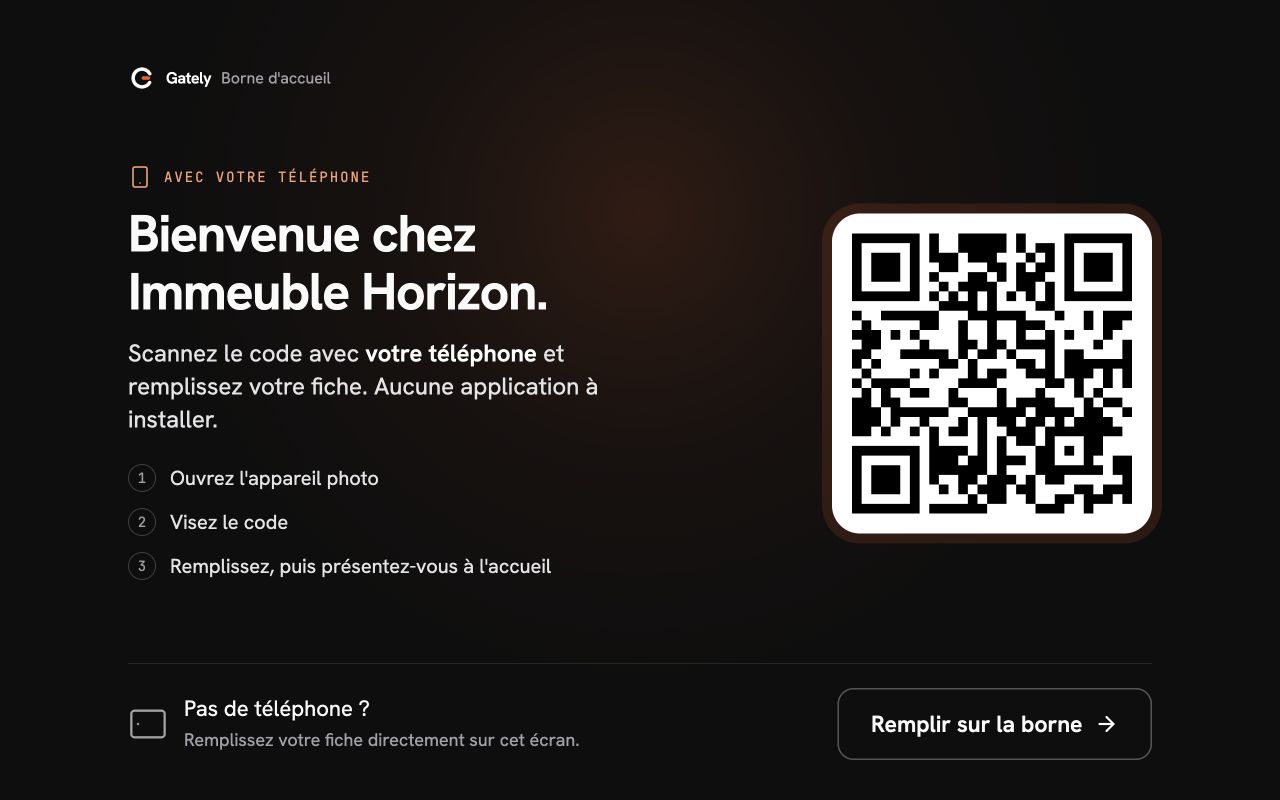
They scan the displayed QR and enter their visit details. Direct entry on the kiosk remains available without a phone.
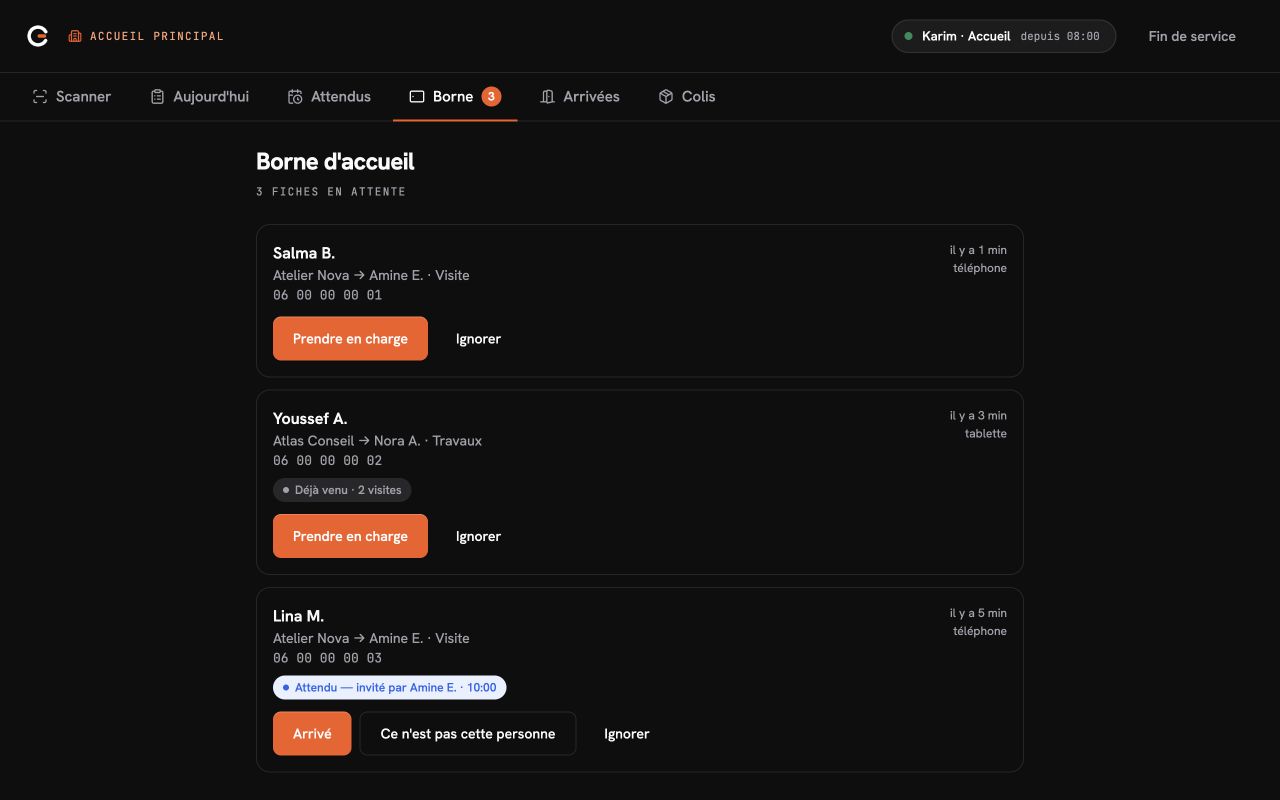
Your team sees the company and host, identifies expected visitors and handles unannounced arrivals.
Gately interfaces captured with demonstration data · in French.
They choose the company, identify their host if known, and enter their contact details and purpose.
The form arrives at the reception desk. Your team reviews it before contacting the host.
Reception follows the response, or lack of response, and applies the site’s procedures.
Reception records admission or refusal. Completing the form does not authorize entry.
Prepares and shares invitations for expected visitors.
Manages its users and visits without accessing another tenant’s data.
Finds expected visitors and handles walk-ins according to the site procedure.
Checks the relevant information and records entry decisions and exit events.
Configures the operating scope and reviews authorised activity across a building or portfolio.
Teams follow site procedures and keep a record of the decision and its context.
Visitors complete their form using the displayed QR or on the kiosk. Reception reviews it, handles the request and records the decision.
The same journey, with a validity period and information suited to the work.
Identify visits with no recorded exit. A manual or system closure remains distinct from an observed departure.
Employees prepare their invitations. Reception finds the announced visits before welcoming your guests.
Explore the office journeyYour users book a space and invite their guests. Reception takes over when they arrive.
Explore the coworking journeyGately Business works with equipment already present on site: a reception computer, a dedicated smartphone or a QR reader connected to a reception workstation. The platform coordinates information and operational decisions without controlling barriers, doors or turnstiles.
For enterprise scopes, Gately can study a dedicated deployment on your infrastructure, according to your technical, operational and data-protection requirements.
Gately Business is priced on quote. The price depends on the number of offices and users, whether it is a building, a headquarters, a campus or a portfolio of sites.
The quote depends on
Gately Business is primarily designed for multi-tenant office buildings and business parks operated by a property manager or FM operator. A headquarters or campus can also be considered according to its operating model.
Yes. Gately Business is a visitor management system for professional sites with shared reception or security. It coordinates invitations, arrivals, service providers and visit records without managing employee attendance or controlling physical access equipment.
No. Visitors receive the necessary information and present their link or QR on arrival, without creating a Gately account.
No. Gately Business can be used from a reception workstation with the web app open and a connected QR reader, or from a dedicated device provided or managed by the site.
No. Gately Business works with existing reception equipment, dedicated smartphones or connected QR readers. It does not control barriers, doors or turnstiles.
Visitors can enter their details on their phone using the QR displayed at reception, without an account or app, or directly on the kiosk in full mode. Reception reviews the form and takes over the request before the host is contacted. The team then records the decision following the site’s procedures.
No. The kiosk helps visitors complete their form on a tablet or on their phone using a QR displayed on screen. An internet connection and a reception team are still required. Neither the form nor the host’s response opens a door.
They use the same visit model as other visitors. Their journey can include recurring validity, the service company, purpose and supporting documents configured by the site.
A scanned exit is recorded as an observed event. When an exit is missing, the session can be reconciled manually or closed by the system without being presented as an observed departure.
No. The MVP scope is online only. If connectivity is lost, the site retains its manual reception and admission procedure.
For enterprise scopes, Gately can study a dedicated deployment on your infrastructure, according to your technical, operational and data-protection requirements. The scope is defined with your teams before a proposal.
Gately Business is priced on quote. The price depends on the number of offices and users on the site, whether it is a building, a headquarters, a campus or a portfolio of sites.
In 30 minutes, we’ll walk through the product using your reception points, tenant companies and current procedures as a starting point.